
You just bought an NVMe SSD that promises 7,000 MB/s write speeds. You plug it in, fire up a benchmark, and there it is — a glorious number right on the label. Then you copy a 200 GB folder of game files, and half an hour later the transfer crawls to a halt. What happened? You just discovered the gap between peak burst speed and sustained write speed, and it is a gap that catches almost everyone off guard.
At Digital Gamer Hub, our team has tested dozens of SSDs across PCIe Gen 3, Gen 4, and Gen 5 drives over the past three years. The pattern is always the same. The number on the box rarely matches what the drive can maintain when the workload gets serious. Understanding sustained write speed vs peak burst performance is the single most important thing you can learn before spending money on a new SSD in 2026.
This guide breaks down exactly what each speed type means, why sustained write speed matters far more for real-world gaming and content creation, and how to make smarter storage decisions without falling for marketing numbers.
What Is Peak Burst Write Speed?
Peak burst write speed is the fastest rate at which an SSD can write data for a short window — usually between a few seconds and a couple of minutes. This is the headline number you see on every product page and retail box. A drive might advertise “up to 7,000 MB/s sequential write,” but that “up to” is doing a lot of heavy lifting.
The reason burst speeds exist comes down to a clever trick called SLC caching. Most modern SSDs use TLC (triple-level cell) or QLC (quad-level cell) NAND flash, which is relatively slow to write to directly. To make the drive feel fast during everyday use, the SSD controller sets aside a portion of the NAND and treats it as if it were SLC (single-level cell) memory. Writing one bit per cell instead of three or four is dramatically faster.
While data is landing in this SLC cache, your write speeds look incredible. A mid-range Gen 4 NVMe drive might sustain 5,000 to 7,000 MB/s during this burst phase. A high-end Gen 5 drive can push past 10,000 MB/s. But this cache is finite. Once it fills up, the party is over, and the drive has to start writing directly to the slower TLC or QLC NAND underneath.
Manufacturers love advertising peak burst numbers because they look impressive on spec sheets. And to be fair, for short everyday tasks like saving a document, installing a small app, or downloading a single game update, burst speed is the only speed that matters. The cache never fills, and the drive stays fast the entire time.
What Is Sustained Write Speed?
Sustained write speed is the rate at which an SSD can continuously write data over extended periods without slowing down. This is the true baseline performance of the drive — the speed it can maintain after all caching mechanisms are exhausted and the controller is writing directly to the raw NAND flash memory.
For a typical consumer TLC NVMe SSD, sustained write speed usually falls somewhere between 800 MB/s and 2,000 MB/s. That is a massive drop from the 5,000 to 7,000 MB/s burst speed the same drive advertises. Budget QLC drives fare even worse, sometimes falling below 200 MB/s sustained — slower than an old mechanical hard drive in some scenarios.
The exact sustained speed depends on several factors: the NAND flash type (TLC is faster than QLC), the controller quality, the drive capacity (larger drives have more NAND channels to write across in parallel), and thermal conditions. But the key takeaway is that sustained write speed represents the honest performance floor of any SSD.
Why does this matter? Because any task that involves writing more data than your SLC cache can hold will eventually run at sustained speed. If you are copying a 150 GB folder of game files, recording 4K gameplay footage to disk, or cloning a drive, you are operating at sustained speed for most of that operation.
Burst vs Sustained Write Speed: Key Differences
The difference between burst and sustained write speed boils down to duration versus headline numbers. Burst speed is a sprint — fast, flashy, and short-lived. Sustained speed is a marathon — slower, steady, and what actually determines your experience during long operations.
Here is a practical breakdown of how the two compare across the factors that matter most:
Duration: Burst speed lasts from a few seconds to a few minutes, depending on the size of the SLC cache. Sustained speed lasts indefinitely, as long as the drive has free space and acceptable temperatures.
Typical speeds on a mid-range Gen 4 NVMe: Burst writes typically hit 5,000 to 7,000 MB/s. Sustained writes usually settle between 1,000 and 1,800 MB/s on TLC drives. That is roughly a 3x to 5x gap.
Cache dependency: Burst speed relies entirely on SLC cache availability. Once the cache is full, burst speed vanishes. Sustained speed is the native write rate of the NAND flash itself, independent of any caching layer.
What manufacturers advertise: Almost exclusively burst speed, with fine print saying “up to.” Sustained speed rarely appears on product pages or marketing materials unless the drive specifically targets professional workloads.
Real-world relevance: Burst speed matters for quick tasks — small file saves, app installs, short downloads. Sustained speed matters for anything that writes more than a few gigabytes at once — game library transfers, video projects, system backups, large game installations.
Consistency: Burst speed is inconsistent by nature — it starts high and drops off a cliff when the cache fills. Sustained speed is consistent, giving you predictable performance throughout the entire operation.
Why Sustained Write Speed Matters More than Peak Burst
Here is the core argument, and it comes directly from real-world testing and community experience: most tasks that genuinely stress your SSD run at sustained speed, not burst speed. The things that make you sit and wait — game installations, copying your Steam library to a new drive, downloading a 120 GB game, rendering video exports — these all exceed the SLC cache capacity on most consumer drives.
Users on Reddit’s r/DataHoarder and r/buildapc consistently report the same frustration. They buy a fast NVMe drive, start a large transfer, and watch their write speeds plummet from thousands of megabytes per second down to 100 to 300 MB/s on some QLC drives. One community member described copying a large media library and seeing the estimated time jump from 8 minutes to over 45 minutes once the cache filled. That is not a minor inconvenience — that is the difference between a drive that does what it promises and one that does not.
The reason sustained write speed matters more is simple math. If your SLC cache holds 50 GB and you are writing 200 GB, you spend roughly 25% of the transfer at burst speed and 75% at sustained speed. The sustained speed has a far larger impact on the total time of the operation.
For gamers specifically, this plays out in several ways. Modern AAA game installations routinely exceed 100 GB. When you download and install a game through Steam or the Xbox app, the SSD has to decompress and write all that data to disk. Shader compilation during first-time game launches writes dozens of gigabytes of compiled shader files. These are sustained workloads, not burst workloads.
Content creators face this even more acutely. Exporting a 4K video project, writing ProRes or DNxHR files, and recording gameplay footage at high bitrates all push sustained write demands that can last tens of minutes or even hours. Peak burst speed provides zero benefit in these scenarios.
Even something as common as moving your game library to a new SSD — a task almost every PC gamer has done — becomes painful when sustained write speeds are low. You plug in the new drive, start the transfer, and then wait. And wait. Because the sustained speed determines how long you wait, not the peak burst speed printed on the box.
How SSD Cache Affects Your Real Performance?
To understand why your SSD slows down, you need to understand how SSD caching works. There are three main types of cache that affect write performance, and each behaves differently.
SLC Cache (Pseudo-SLC)
Most consumer NVMe SSDs use what is called pseudo-SLC caching. The controller dynamically allocates a portion of the TLC or QLC NAND and uses it in SLC mode — storing one bit per cell instead of three or four. This dramatically speeds up writes while the cache has room.
The cache can be static (a fixed portion of the drive reserved permanently) or dynamic (variable size that shrinks as the drive fills up). Static caches are more predictable because the fast write zone stays the same size regardless of how full the drive is. Dynamic caches start large on an empty drive but can shrink to almost nothing on a nearly full drive, which is why your SSD feels slower when it is near capacity.
Once the SLC cache fills, the controller has to flush cached data to the slower TLC or QLC NAND while simultaneously handling new incoming writes. This is the moment speeds drop, and on some budget drives, they drop hard — sometimes below 200 MB/s on QLC models.
DRAM Cache
Higher-end SSDs include a dedicated DRAM chip that acts as a mapping table for the NAND flash. This does not directly speed up writes in the same way SLC cache does, but it helps the controller manage data placement and garbage collection far more efficiently. Drives with DRAM tend to have more consistent sustained write performance because the controller can make smarter decisions about where to write data.
Budget drives often skip DRAM entirely, using a technology called HMB (Host Memory Buffer) that borrows a small amount of your system RAM instead. HMB works well for most consumer workloads but can fall behind during heavy sustained writes compared to drives with dedicated DRAM.
The Cache Exhaustion Cliff
The most important thing to understand about SSD cache is the exhaustion pattern. When you start writing data, speeds are at peak burst. As the SLC cache fills, the drive reaches a tipping point where it can no longer maintain burst speeds. The transition is often abrupt — speeds do not gradually decline. They fall off a cliff.
Forum users on r/DataHoarder report this cliff as the single most frustrating aspect of SSD ownership. A drive that feels blazing fast for everyday use suddenly becomes painfully slow the moment you push it with a sustained workload. This is exactly why understanding sustained write speed matters — it tells you what waits at the bottom of that cliff.
How Sustained Write Speed Affects Gaming in 2026?
Gaming is where the sustained vs burst debate gets really interesting, because the answer depends heavily on what kind of gaming you do and where the industry is headed.
Current Gaming: When Speed Matters?
For most current games, the truth is that SSD speed — even sustained speed — does not dramatically affect in-game performance once you are past SATA III levels. A SATA SSD with 500 MB/s sustained reads will load most games within a few seconds of a Gen 4 NVMe at 7,000 MB/s. The community consensus on r/pcgaming and r/buildapc echoes this: PCIe Gen 3 vs Gen 4 vs Gen 5 barely moves the needle for current game load times.
Where sustained write speed does matter for gaming right now is during game installations and updates. Modern AAA titles regularly exceed 100 GB. Downloading and decompressing a game of that size is a sustained write operation. If your drive has poor sustained write speeds, the installation process crawls, especially during the decompression and file-copying phases. A game that takes 3 minutes to install on a drive with good sustained write performance could take 15 minutes on a QLC drive with terrible sustained writes.
Shader compilation is another area where sustained writes matter. When you launch a new game for the first time, the engine compiles thousands of shaders and writes them to disk. This process can write 20 to 50 GB of data, depending on the game, and it runs at sustained write speed. A slow drive means longer shader compilation, which means more time staring at loading screens before you can actually play.
DirectStorage API and the Future
Microsoft’s DirectStorage API is changing the game. Originally developed for Xbox Series X and now available on PC, DirectStorage allows games to load assets directly from the SSD to the GPU, bypassing the CPU bottleneck that traditionally limited how fast games could load. This technology requires consistently fast storage — and that means sustained performance matters more than ever.
As more games adopt DirectStorage in 2026 and beyond, the sustained read and write characteristics of your SSD will directly impact how quickly game worlds load, how detailed textures can stream in during gameplay, and whether you experience pop-in or stuttering during fast travel. Burst speed alone will not save you when a game is continuously streaming gigabytes of texture data from disk.
Next-Gen Console Requirements
Sony’s PS5 requires an NVMe SSD with at least 5,500 MB/s sequential read speed for the expansion slot. But what Sony does not advertise is that sustained write speed also matters when you are copying games to the internal SSD or downloading large game files. The PS5’s custom storage architecture is designed around consistent throughput, and drives with poor sustained performance can cause issues during large data operations.
The Xbox Series X uses a similar approach with its Velocity Architecture. Both consoles treat the SSD as a core component of the gaming experience, not just dumb storage. As cross-platform game development increasingly assumes fast, consistent storage, PC gamers who ignore sustained write speed will find themselves at a disadvantage.
Factors That Affect Sustained Write Speed
Not all SSDs are equal when it comes to sustained write performance. Several hardware and environmental factors determine how fast your drive writes when the cache is gone.
NAND flash type: TLC NAND delivers significantly better sustained writes than QLC NAND. A TLC drive might sustain 1,000 to 2,000 MB/s after cache exhaustion, while a QLC drive can drop below 200 MB/s. If sustained performance matters to you, avoid QLC drives.
Drive capacity: Larger capacity SSDs have more NAND die, which means more channels for the controller to write across simultaneously. A 2 TB drive will typically have better sustained write speeds than a 500 GB drive of the same model, because the controller has more parallel paths to work with.
Controller quality: The SSD controller manages how data is written to the NAND flash. Better controllers can maintain higher sustained speeds through smarter data placement, more efficient garbage collection, and better handling of cache flushes. This is one area where paying more for a reputable brand with a proven controller pays off.
Thermal throttling: When an SSD works hard during sustained writes, it generates heat. If the controller temperature exceeds its threshold (usually around 70 degrees Celsius), the drive will throttle speeds to protect itself. Drives with better thermal management — either built-in heatsinks or good airflow in your case — can maintain peak sustained speeds for longer. PCIe Gen 5 drives are especially prone to thermal throttling due to their higher power draw.
Drive health and free space: As an SSD fills up, the controller has fewer free blocks to work with, which can reduce sustained write performance. This is particularly noticeable on drives with dynamic SLC caching, where the cache size shrinks as the drive fills. Keeping 15 to 20% of your drive free helps maintain consistent performance.
How to Test Your SSD Sustained Write Speed?
If you want to see the real performance of your SSD — not the burst speed, but the sustained speed — you need to test it properly. Standard quick benchmarks like CrystalDiskMark’s default run only measure burst speed. Here is how to see the truth.
Use a tool that supports extended write testing. Iometer, fio (Flexible I/O Tester), or the HD Tune Pro write benchmark can all push sustained writes long enough to exhaust the SLC cache. Set the test to write a file larger than your drive’s SLC cache — typically 100 GB or more for accurate results.
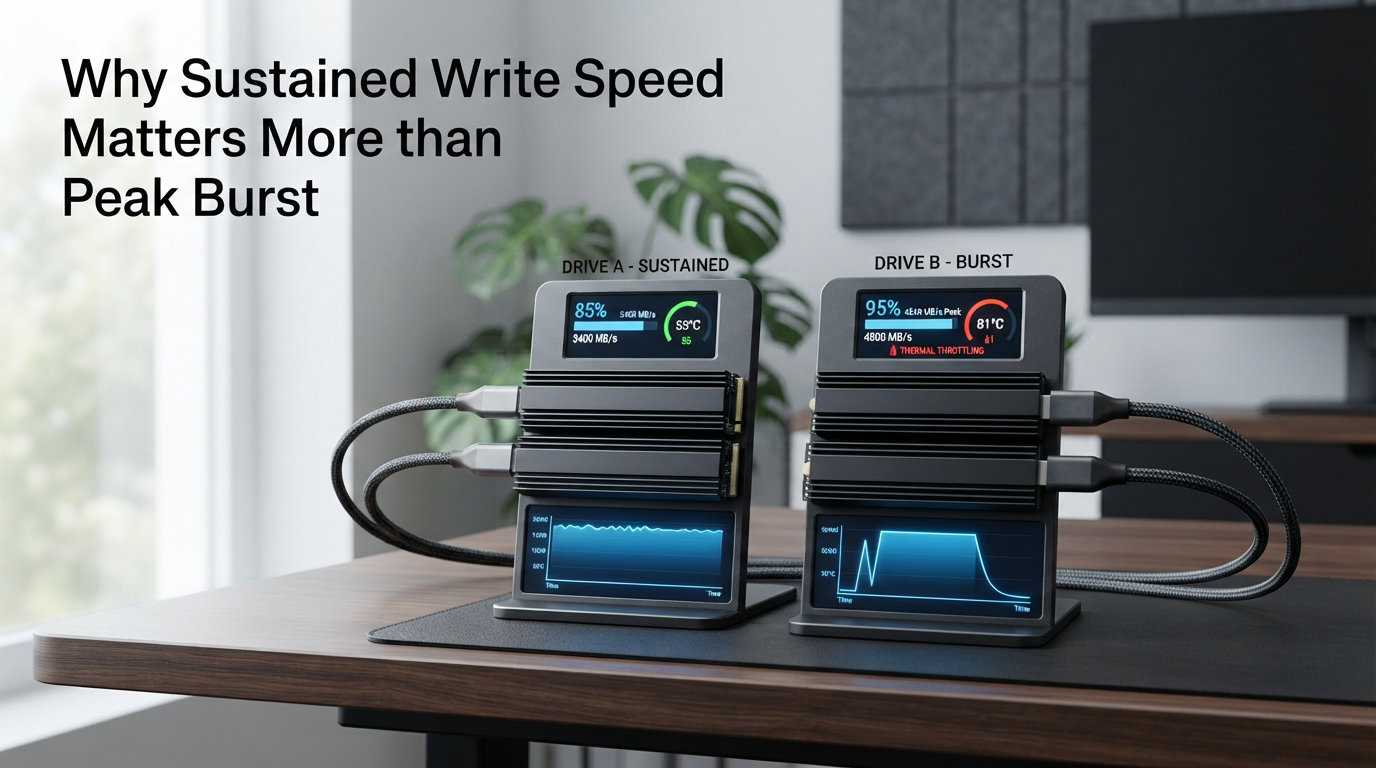
Watch the speed graph during the test. You will see a high plateau (burst speed) followed by a sharp drop (cache exhaustion) followed by a lower plateau (sustained write speed). That lower plateau is the number that actually matters for large file operations.
You can also do a simple real-world test. Copy a folder with 100+ GB of files to your SSD and time it with a stopwatch. Divide the total gigabytes by the time in seconds to get your effective sustained write speed. It will be far lower than the number on the box — and that is perfectly normal.
Frequently Asked Questions
What is a good read and write speed for NVMe SSD?
A good NVMe SSD should deliver at least 3,000 MB/s sequential read and 1,500 MB/s sustained write speed for most gaming and general use. High-end Gen 4 drives offer 7,000 MB/s read and 2,000+ MB/s sustained write, while Gen 5 drives push past 10,000 MB/s read. For gaming specifically, anything above 2,500 MB/s read with decent sustained writes will handle current titles well.
Does SSD read and write speed affect gaming?
SSD speed affects game installation times, shader compilation, and texture streaming, but the difference between a fast NVMe and a decent NVMe during actual gameplay is small for most current games. Where it matters is load times for open-world games, how quickly assets stream during fast travel, and installation speed for large game files. DirectStorage API in newer titles makes consistent SSD speed more important than peak burst speed.
What is the sustained write speed of NVMe SSD?
Sustained write speed on NVMe SSDs varies by NAND type and drive quality. TLC NVMe drives typically sustain 800 to 2,000 MB/s after their SLC cache fills. QLC NVMe drives can drop to 100 to 300 MB/s sustained. Enterprise and high-end consumer drives with PLM (Power Loss Management) and better controllers can sustain 2,000 to 3,000 MB/s. The advertised 5,000 to 7,000 MB/s numbers are burst speeds, not sustained.
Why is a solid state drive considered better than a hard disc for speed?
SSDs use NAND flash memory with no moving parts, giving them access times measured in microseconds compared to the milliseconds a spinning hard drive platter requires. Even the slowest SSD writes at 100+ MB/s sustained, while a 7200 RPM hard drive peaks around 150 MB/s sequential. SSDs also handle random reads and writes far better, which is what makes your PC feel responsive during everyday tasks.
Why does my NVMe SSD slow down during large file transfers?
Your NVMe SSD slows down because its SLC cache has filled up. During short writes, the SSD uses a fast cache layer to absorb data quickly. Once that cache is exhausted (usually after writing 20 to 100 GB depending on the drive), the controller must write directly to the slower TLC or QLC NAND flash underneath. This is the drive’s sustained write speed, and it is often 3 to 5 times slower than the advertised burst speed. This is completely normal behavior for consumer SSDs.
Final Thoughts
Peak burst speed is what sells SSDs. Sustained write speed is what determines whether you actually enjoy using them. The gap between the two can be massive — a drive advertising 7,000 MB/s might sustain only 1,000 MB/s under real-world pressure. For gamers installing 150 GB games, content creators exporting 4K video, or anyone moving large files between drives, sustained write speed is the number that actually dictates your wait time.
Before you buy your next SSD, look past the marketing headline. Check independent benchmarks that test sustained write performance, not just peak burst. Pay attention to whether the drive uses TLC or QLC NAND. Consider whether it has DRAM cache or relies on HMB. These factors determine the sustained write speed that will define your real experience — and in 2026, there is no reason to settle for a drive that only performs well during the first 30 seconds of a transfer.
Leave a Reply